Mods for The Blood of Dawnwalker: the timer, combat, loot and how to install them
The first mods aimed at the game's friction points, and the most popular one stretches the 30-day clock. None of them are made or supported by Rebel Wolves.
The clock
- Better Story Timer, by Caites. Raises the main-story limit to 90 days and the daily segments from eight to 16 or 32, and can optionally strip the time cost from traits and abilities. Comes in several versions; install only one.
- Timeless Treasure, by bruender09. Removes the time cost from treasure maps and world chests.
Combat friction
- nectarines. Separate mods that double the parry window, remove stamina costs from sprinting, blocking and dodging, and remove cooldowns, vampire abilities included.
- Caites. Lets you set enemy health, damage, stamina and parry windows yourself.
Loot and comfort
- Naxterra. Loots containers, corpses and gathering spots automatically.
- Glacknarf. Gives merchants more money, and separate mods that switch off the recurring peasant dialogue.
- Caites. Fine-tunes loot quality.
Look and feel
- Vercadi. Engine tweaks that, among other things, remove motion blur.
- fostot. Ten hairstyles with up to 441 colour combinations.
- H0tGlueGun. A transmog manager: changes how gear looks and keeps its stats.
- HeadBangingDead. A ReShade preset for vibrance and HDR that the author says costs no performance.
The most popular mods on Nexus Mods shortly after launch.
Changing the 30 days
The most endorsed mod on Nexus shortly after launch was Better Story Timer, and the story-timer mods reportedly dominated the charts within days. That is no surprise on a game whose whole structure is a clock that quests and skills spend. The tension is arguably intentional — you cannot see everything in one run — so these mods remove part of the design on purpose, and whether that is a good thing comes down to personal preference. What the timer does when it simply runs out, with no mod at all, is on the after-30-days page.
Better Story Timer's author says it does not affect achievements; for any other mod, check its own page. The time planner works from the game's own numbers, not a modded clock.
Three ways a mod installs
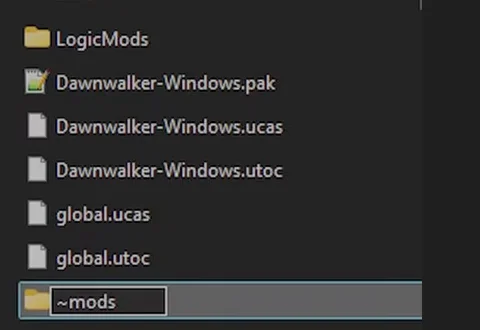
Modding works on the PC versions from Steam and GOG; consoles are not supported. There is no load-order system, and several PAK mods generally coexist as long as they do not change the same system. Each type goes in a different place, and a mod in the wrong folder does nothing and says nothing.
| Type | Goes in | The catch |
|---|---|---|
| PAK mod | Content\Paks\~mods\ | The tilde in ~mods is required. Without it the game ignores everything in the folder. |
| INI mod | %LOCALAPPDATA%\Dawnwalker\Saved\Config\Windows\ | The file must be set to read-only, or the game overwrites it. |
| UE4SS mod | The Win64 folder next to Dawnwalker.exe | Not Engine\Binaries\Win64. Use the build adapted for this game; the stock release can crash it. |
When it goes wrong
- Nothing happens
- Check the destination folder first. Is the tilde in ~mods? Is the INI file actually read-only?
- Crashes after installing UE4SS
- Remove its folder and dwmapi.dll, then start again clean. Deleting only the folder leaves conflicts behind.
- You cannot tell which mod crashes it
- UE4SS's author suggests moving all your mods out, then adding them back one at a time until the crash returns.
- Stutter for no obvious reason
- UE4SS opens a console window that can cost performance. Set ConsoleEnabled to 0 in UE4SS-settings.ini.
- A mod stopped working after a patch
- Updates reset INI files, which clears their read-only flag. UE4SS builds are tied to a game version, so re-download it too.
Mods for the game’s other gaps
Three gaps in the game have their own mods. There is no respec in the game, and two PC mods add one; that is on the skills page. There is no New Game Plus yet, and a mod fakes it by exporting your character into a fresh campaign; that is on the New Game Plus page. And the PC menu has no field-of-view option and letterboxes ultrawide cutscenes, both of which mods address, on the PC settings page. The shrine-only fast travel rule has a mod too, on the getting-around page. If a mod is the suspect in a crash, the stuttering and crashing reports the developer has actually patched are on the known issues page.
Keep going